|
|
Joined: Jun 2025
Posts: 7
Nutrimatic drinks dispenser
|
|
Nutrimatic drinks dispenser
Joined: Jun 2025
Posts: 7 |
set font Terminal 14 regular type a whatever string containing a space the space is not properly rendered as monospaced was fine as of 7.83 bugged from 7.84 onwards see in screenshot, mirc 7.83 on top of 7.84: 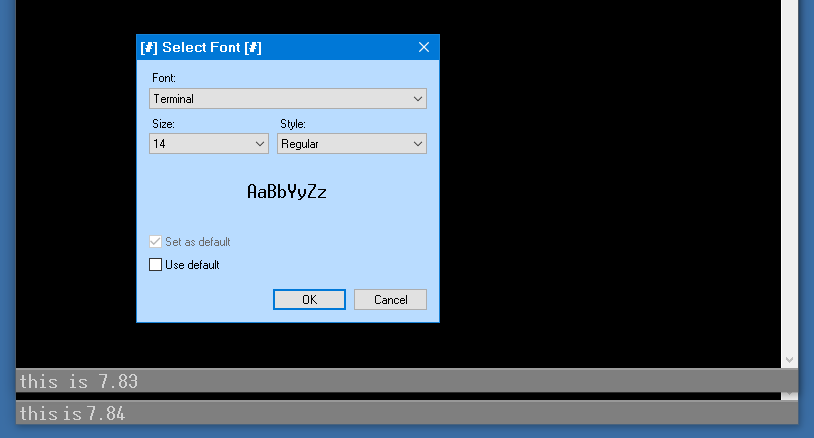 (if that doesn't work: https://ibb.co/QvHJPNz1)
|
|
|
|
|
Joined: Dec 2002
Posts: 3,937
Hoopy frood
|
|
Hoopy frood
Joined: Dec 2002
Posts: 3,937 |
Thanks for your bug report. This looks like it is related to this post. I wasn't able to reproduce your issue here, however my guess is that because mIRC v7.84 onwards are now using the newer Windows richedit control for the editbox, it is handling the font-linking differently on systems that use non-English languages with older fonts such as FixedSys and Terminal. I am not sure if there is a solution to this other than reverting to the older richedit control, which has its own issues. Which version of Windows are you using?
|
|
|
|
|
Joined: Jun 2025
Posts: 7
Nutrimatic drinks dispenser
|
|
Nutrimatic drinks dispenser
Joined: Jun 2025
Posts: 7 |
Windows 10 [Version 10.0.19043.928]
EDIT:
i have just tested in vm:
new installation of 21h1; no languages except english
new installation of mirc
bug reproduced in 7.85
the bug is only when typing a space, i.e. changing from terminal 9 to terminal 14 will now render an already-typed bugged text correctly (but a new space will be bugged again)
Last edited by hundreAd; 09/10/26 11:45 PM.
|
|
|
|
|
Joined: Dec 2002
Posts: 3,937
Hoopy frood
|
|
Hoopy frood
Joined: Dec 2002
Posts: 3,937 |
I am afraid I have not yet been able to reproduce this issue under Windows 10/11 English. That said, it is important to note:
The way the richedit editbox displays text has always depended on the Windows version, configuration, installed fonts, etc.
mIRC v7.84 and onwards use the newer version of the Windows richedit control, which is why you are seeing this change in the editbox. Of course, I keep saying "newer" richedit control... but richedit 4.1 was released with Windows XP. While mIRC could continue using the older richedit control, it really should use the newer version, with its improved script/language support, for Windows 10/11.
|
|
|
|
|
Joined: Jun 2025
Posts: 7
Nutrimatic drinks dispenser
|
|
Nutrimatic drinks dispenser
Joined: Jun 2025
Posts: 7 |
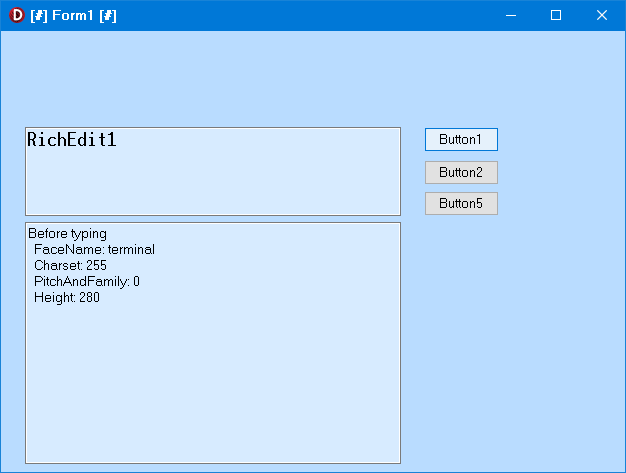
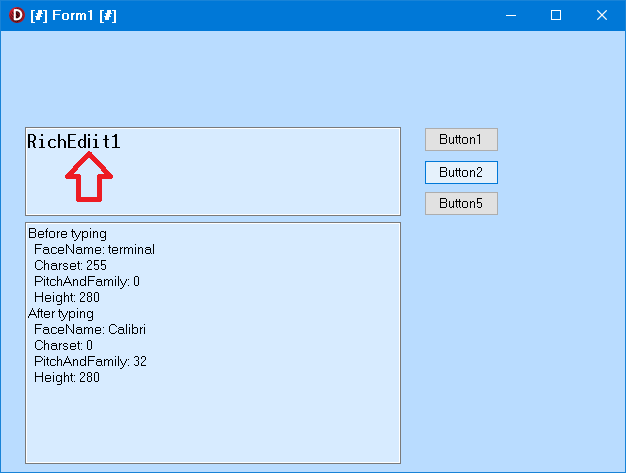
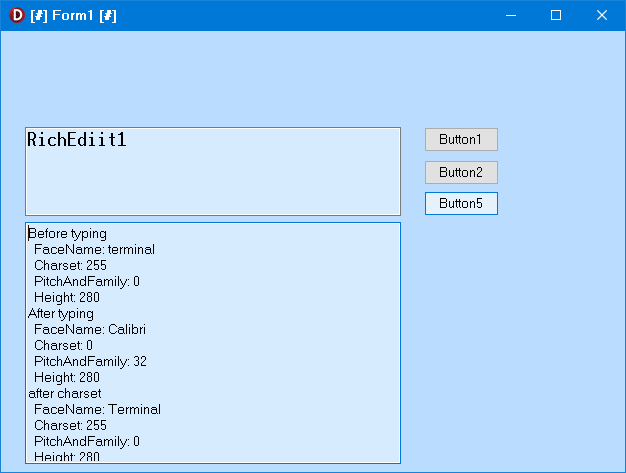
i have reproduced the bug with independent code this is definitely RICHEDIT50W problem (un-bugged for RICHEDIT20W) problem is that entering new text in richedit ignores the font and uses Calibri instead; font was originally set to times new roman, so Calibri is unexpected -- probably hardcoded, it does not matter if Calibri isn't even installed note that my code will ALWAYS use Calibri, so mirc does something to mitigate that, since only spaces are rendered wrong (i.e. possibly already halfway to a fix) as a workaround, re-setting charset after every char typed will force the control to re-render existing text (will not fix new text) or give an option to use RICHEDIT20W i can live with changing from v2 to v5 or vice versa requiring mirc restart to take effect
unit Unit1;

interface

uses
  Winapi.Windows,
  Winapi.Messages,
  System.SysUtils,
  System.Variants,
  System.Classes,
  Vcl.Graphics,
  Vcl.Controls,
  Vcl.Forms,
  Vcl.Dialogs,
  Vcl.StdCtrls,
  Vcl.ComCtrls;

type
  TRichEdit = class(Vcl.ComCtrls.TRichEdit)
  protected
    procedure CreateParams(var Params: TCreateParams); override;
  end;

  TForm1 = class(TForm)
    Button1: TButton;
    Button2: TButton;
    RichEdit1: TRichEdit;
    Memo1: TMemo;
    Button5: TButton;
    procedure Button1Click(Sender: TObject);
    procedure Button2Click(Sender: TObject);
    procedure Button5Click(Sender: TObject);
  private
    { Private declarations }
  public
    { Public declarations }
  end;

var
  Form1: TForm1;

implementation

{$R *.dfm}

uses
  RichEdit;

procedure TRichEdit.CreateParams(var Params: TCreateParams);
const
  RICHEDIT_CLASS = 'RICHEDIT50W';  RICHEDIT_LIBRARY = 'msftedit.dll';
  // RICHEDIT_CLASS = 'RICHEDIT20W';  RICHEDIT_LIBRARY = 'riched20.dll';

begin
  if LoadLibrary(RICHEDIT_LIBRARY) = 0 then
    RaiseLastOSError;

  inherited CreateParams(Params);
  CreateSubClass(Params, RICHEDIT_CLASS);
end;

procedure DumpCharFormat(Handle: HWND; const Caption: string);
var
  CF: CHARFORMAT2W;
begin
  ZeroMemory(@CF, SizeOf(CF));
  CF.cbSize := SizeOf(CF);

  SendMessageW(Handle, EM_GETCHARFORMAT, SCF_SELECTION, LPARAM(@CF));

  Form1.Memo1.Lines.Add(Caption);
  Form1.Memo1.Lines.Add('  FaceName: ' + PWideChar(@CF.szFaceName));
  Form1.Memo1.Lines.Add('  Charset: ' + inttostr(CF.bCharSet));
  Form1.Memo1.Lines.Add('  PitchAndFamily: ' + inttostr(CF.bPitchAndFamily));
  Form1.Memo1.Lines.Add('  Height: ' + inttostr(CF.yHeight));
end;

procedure TForm1.Button1Click(Sender: TObject);
begin
  RichEdit1.Font.Name := 'terminal';
  RichEdit1.Font.Size := 14;
  RichEdit1.Font.Charset := OEM_CHARSET;
  DumpCharFormat(RichEdit1.Handle, 'Before typing');
end;

procedure TForm1.Button2Click(Sender: TObject);
begin
  DumpCharFormat(RichEdit1.Handle, 'After typing');
end;

procedure TForm1.Button5Click(Sender: TObject);
var
  CF: CHARFORMAT2W;
begin
  FillChar(CF, SizeOf(CF), 0);
  CF.cbSize := SizeOf(CF);
  CF.dwMask := CFM_FACE or CFM_CHARSET;
  CF.bCharSet := OEM_CHARSET;
  StringToWideChar('Terminal', CF.szFaceName, LF_FACESIZE);

  SendMessage(RichEdit1.Handle, EM_SETCHARFORMAT, SCF_ALL, LPARAM(@CF));
  DumpCharFormat(RichEdit1.Handle, 'after charset');
end;

end.
|
|
|
|
|
Joined: Dec 2002
Posts: 3,937
Hoopy frood
|
|
Hoopy frood
Joined: Dec 2002
Posts: 3,937 |
Thanks for the feedback.
I have reproduced the issue. I had assumed that pasting text or using /editbox would be sufficient to reproduce the issue. But I have to type in the text character by character to reproduce it. The richedit editbox displays the text and spacing correctly when any other method is used to set the editbox text.
I ended up using Claude to try to pinpoint the cause of the issue. There was no combination of richedit messages or settings that would resolve it. It is hard-coded into msftedit.dll. As far as I can tell, it only affects fonts that have some combination of non-ttf, OEM_CHARSET, no ANSI_CHARSET, fixed pitch, etc. It seems that for neutral characters, like spaces, msftedit.dll will try to use a font's ANSI_CHARSET. If it does not have one, it uses the default GUI font.
Terminal font is probably the only standard font where you are going to see this because it is so old.
|
|
|
|
|